
 WebFont/macOS App
Focused font workflows
Build fonts from SVG, subset and convert, then ship web-ready font files
WebFont is a local macOS app for text-to-SVG outlines, building icon and color fonts from SVG artwork, subsetting, converting, and packaging web fonts.

Build fonts from SVGs. Generate subsets from text.
WebFont combines text-to-outline export, SVG-based font building, source font replacement, subsetting, conversion, validation, and web package generation in one local macOS workflow.
Create text and glyph artwork
Turn words, phrases, and multi-line text into SVG outlines with every available variable axis, or prepare outlined SVG artwork for icon and web font building. Supported color glyphs keep their color artwork.
Build or edit fonts
Build monochrome or color fonts from SVG glyphs. Rebuild supported imported color glyphs as artwork, or edit a supported static, non-color TrueType source font.
Check and ship outputs
Run Preflight Check, validate generated fonts, then export TTF, WOFF, WOFF2, glyph assets, or a web package with CSS, demo HTML, and metadata.
What the current app can do
Text to SVG Outlines
Turn text into SVG outlines with size, every available variable axis, spacing, wrapping, alignment, and fallback controls. Supported vector color glyphs keep their color artwork, bitmap color glyphs are embedded as PNG, and monochrome artwork uses the chosen fill color. Text to SVG does not export a static font instance.
Font Builder
Build monochrome or color fonts from static SVG artwork. Color mode keeps supported fills, strokes, linear/radial gradients, and opacity in COLR/CPAL, with SVG fallback for supported gradient/effect glyphs. Add palettes for light or dark backgrounds, then export TTF, WOFF, WOFF2, or a web package.
Source Font Editing
Adding or replacing glyphs while preserving the source font structure is limited to supported static, non-color TrueType fonts. Separately, import supported COLR/SVG glyphs as vector artwork to rebuild a font; unsupported color effects or bitmap imports may fall back to monochrome outlines with a warning.
Preflight Check
Report Unicode conflicts, duplicate glyph names, empty paths, abnormal SVG sizes, metric issues, unsupported SVG features, and overly complex artwork before export.
Project Files and Templates
Save .webfontproject packages with embedded source font data, SVG glyphs, build settings, output options, and replacement targets. Export SVG templates with guides before drawing.
Subset Generation
Create subsets from selected glyphs, pasted text, .txt files, or Unicode presets. Supports TTF, OTF/CFF/CFF2, WOFF, WOFF2, and a selected TTC/OTC face, including variable and color fonts. Export original-outline TTF/OTF, WOFF, and WOFF2, or bake a static instance from the Export panel.
Web Font Conversion
Package or unpack WOFF/WOFF2 while retaining source outlines, variable axes, and color data. Explicit TTF/OTF targets convert supported static TrueType ↔ CFF and variable TrueType (glyf/gvar) ↔ CFF2 fonts, including supported COLR v0/v1 and OpenType-SVG color data. See the limits below.
Web Package and Validation
Export font files, @font-face CSS, and demo HTML; Font Builder packages also add metadata.json, glyph previews, and HTML snippets. Color demos include palette controls where supported, and static-instance exports write matching font-weight/stretch/style CSS. Outputs are validated, with decode round trips for web formats; display of color effects depends on the destination browser or app.
Color Glyph Preview and Export
Preview original colors where macOS supports the format; CBDT PNG glyphs also use a built-in bitmap reader. Export PNG/PDF or vector SVG for supported COLR/SVG artwork. Bitmap glyphs and effects without an exact SVG equivalent export as a PNG embedded in SVG.
Glyph Asset Export
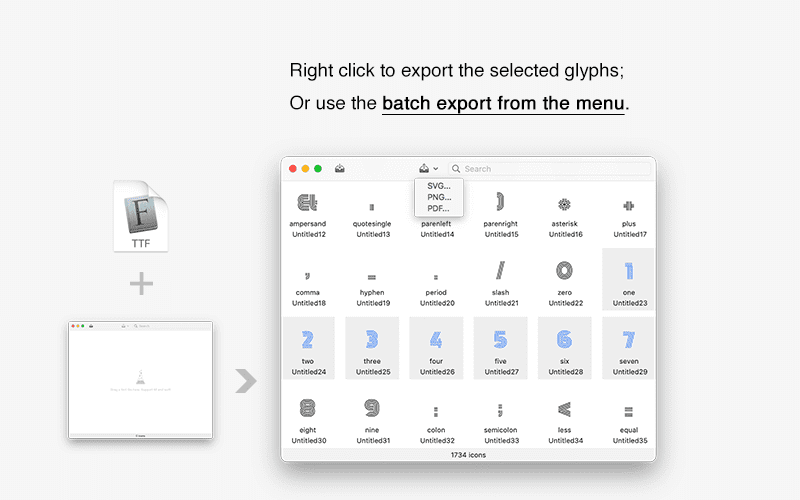
Browse the glyph grid and export one glyph or a multi-selection as SVG, PNG, or PDF. Exports use the selected size and foreground color; color glyphs keep their colors where supported. Variable-font instance settings do not change glyph asset export.
Real font production jobs
Icon font production
Build icon fonts from outlined SVG symbols, map icons to Unicode, run Preflight Check, and export browser-ready font packages.
Text artwork and lettering
Convert words, phrases, and multi-line copy into real font outlines for logos, docs, handoff, posters, and SVG-based design assets.
Web font optimization
Create subsets from selected glyphs or text, keep needed OpenType features, and ship only the web font formats your product needs.
Font release checks
Validate generated TTF, OTF, WOFF, and WOFF2 outputs, review character coverage and warnings, and inspect a demo page before publishing.
Clear rules, safer output
WebFont favors explicit behavior over silent changes. Unsupported SVG and font features are reported so you can fix artwork before it becomes a production font.
- Font Builder requires static outlined SVG artwork. Live text, raster images, masks, filters, scripts, animation, and external resources are unsupported; color mode also rejects patterns and unsupported blending.
- Editing an existing font while retaining its structure supports only eligible static, non-color TrueType sources. Importing color glyph artwork to rebuild a new font is a separate workflow.
- Subset one source font or a selected TTC/OTC face at a time. Outputs preserve the original outlines, variable axes, and supported color resources.
- Text to SVG keeps supported vector color glyphs and embeds bitmap color glyphs as PNG; the fill color applies to monochrome artwork. Its variable-axis controls change the artwork only; it does not produce a static font file.
- All processing runs locally on the Mac. Font files are not uploaded by the app.
- Outline conversion keeps glyph IDs and supported COLR v0/v1, CPAL, and OpenType-SVG data. Supported variable fonts retain all axes. Original hinting is removed; curve approximation may change rendering and file size. Bitmap and incompatible layout/variation data are rejected with a reason.
- Color display depends on renderer support. Supported COLR/SVG glyphs export as vector SVG; bitmap glyphs and effects without an exact SVG equivalent use embedded PNG. Data preservation does not guarantee display in every app.
- The main glyph grid previews variable fonts at their default instance and identifies axes. In the Export panel, “Keep all axes” exports the variable font, while “Static instance” bakes the current axis values into Font Subset and Web Package outputs; unlisted axes are pinned to their defaults, and the font's name and weight/style metadata are not rewritten.
TTF, OTF & Web Font Conversion Rules
WOFF/WOFF2 packaging changes the container, not the outline type. TTF/OTF (original outlines) restores .ttf for TrueType or .otf for CFF/CFF2. Explicit outline targets support static TrueType ↔ CFF and eligible variable TrueType ↔ CFF2. Matching outlines pass through unchanged. Single and Batch Conversion show specific failure reasons; batch jobs continue and report success/failure totals. Invalid data or format limits can prevent conversion.
| Input Format | Target Option | Actual Output | Status | Outline & Conversion Details |
|---|---|---|---|---|
| TTF | WOFF / WOFF2 | .woff / .woff2 | Supported | Packages TrueType outlines as a web font. Keeps the outline type, variable axes, and color data. |
| OTF (CFF/CFF2) | WOFF / WOFF2 | .woff / .woff2 | Supported | Packages CFF/CFF2 outlines as a web font. Keeps the outline type, variable axes, and color data. |
| WOFF / WOFF2 | TTF/OTF (original outlines) | .ttf | Supported | Restores TrueType outlines as .ttf. Does not change the outline type, and keeps variable axes and color data. |
| WOFF / WOFF2 | TTF/OTF (original outlines) | .otf | Supported | Restores CFF/CFF2 outlines as .otf. Does not change the outline type, and keeps variable axes and color data. |
| Static TTF | OTF (PostScript outlines) | .otf | Supported (static fonts) | Static TrueType to CFF, including COLR v0/v1 and OpenType-SVG. Keeps glyph IDs, color layers, gradients, and palettes. Elevates quadratic curves to cubic curves and removes hinting. |
| Static OTF (CFF) | TTF (TrueType outlines) | .ttf | Supported (static fonts) | Static CFF to TrueType, including COLR v0/v1 and OpenType-SVG. Keeps glyph IDs, color layers, gradients, and palettes. Approximates cubic curves with quadratic curves and removes hinting. |
| Variable TrueType ↔ CFF2 | TTF / OTF | .ttf / .otf | Supported with limits | Keeps all axes and supported color data; outline conversion itself does not pin axes. To export a fixed-axis file, use the Export panel's Static instance mode with Font Subset or a web package. Requires 1–16 axes, at most 48 outline variation regions, compatible master contours and solvable variation data. Conversion can still fail validation or size/coordinate limits; CFF2 output can be much larger. |
| Bitmap color (sbix/CBDT/EBDT) | Outline conversion | — | Not supported | Does not turn bitmap artwork into vector outlines. Use original-outline export or web packaging to keep the bitmaps. |
| TTC / OTC | Single / Batch Conversion | — | Not supported | Select one face in the main window and create a subset instead. |
| Unsupported variation data | Change outline type | — | Not supported | VARC outlines, CFF1 with variation axes, CFF2 without fvar, incompatible master contours, unsolvable regions, and fonts exceeding conversion limits cannot change outline type. Use original-outline export or web packaging where supported. |
| Incompatible layout data | Change outline type | — | Not supported | Some legacy AAT tables and layout records referring to original outline point indices prevent safe conversion. The specific reason is shown. |