
 LittleASR/macOS App
Speech to text.
Subtitles, locally.
High-performance speech-to-text powered by Whisper. Transcribe audio and video, then export SRT, VTT, or TXT—secure, private, and 100% local on your Mac.

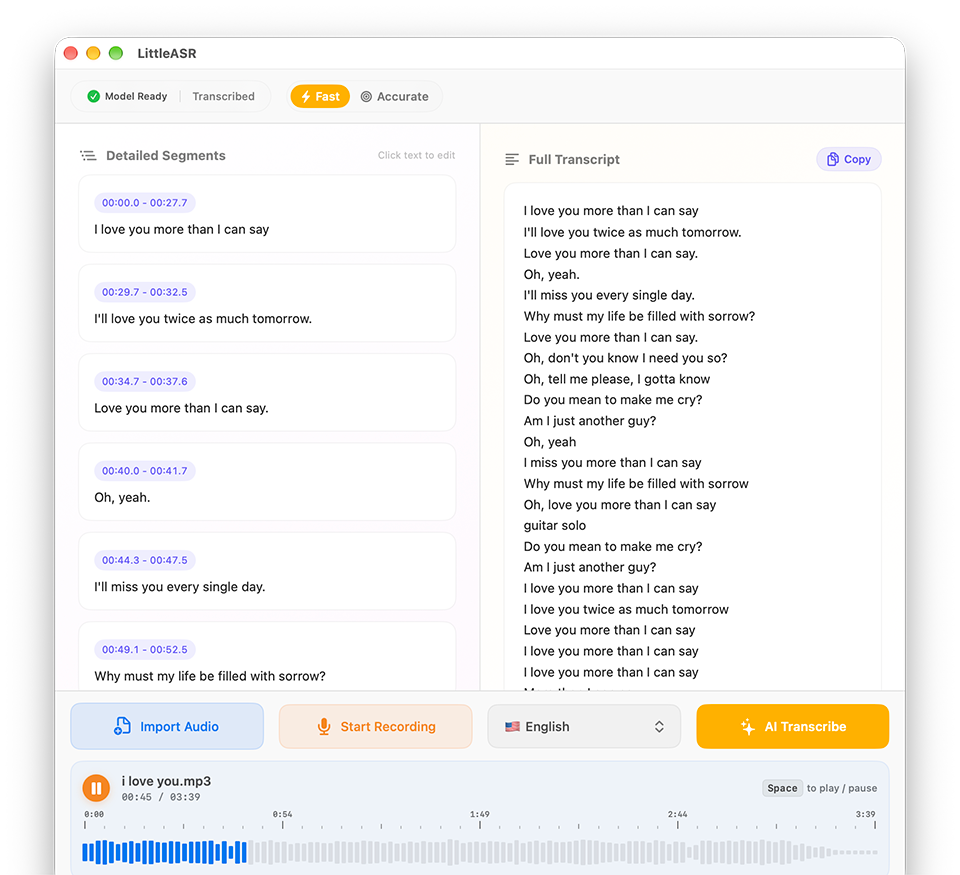
Audio to Text.
Like magic.
High-performance offline transcription for your meetings, voice memos, or videos. Process entire files seamlessly with near-perfect accuracy—even in noisy environments.
Supporting 100 languages and dialects
English • Chinese • Cantonese • Japanese • Korean • French • German • Spanish • Russian • Italian • Portuguese • Turkish • Polish • Catalan • Dutch • Arabic • Swedish • Indonesian • Hindi • Finnish • Vietnamese • Hebrew • Ukrainian • Greek • Malay • Czech • Romanian • Danish • Hungarian • Tamil • Norwegian • Thai • Urdu • Croatian • Bulgarian • Lithuanian • Latin • Maori • Malayalam • Welsh • Slovak • Telugu • Persian • Latvian • Bengali • Serbian • Azerbaijani • Slovenian • Kannada • Estonian • Macedonian • Breton • Basque • Icelandic • Armenian • Nepali • Mongolian • Bosnian • Kazakh • Albanian • Swahili • Galician • Marathi • Punjabi • Sinhala • Khmer • Shona • Yoruba • Somali • Afrikaans • Occitan • Georgian • Belarusian • Tajik • Sindhi • Gujarati • Amharic • Yiddish • Lao • Uzbek • Faroese • Haitian • Pashto • Turkmen • Nynorsk • Maltese • Sanskrit • Luxembourgish • Myanmar • Tibetan • Tagalog • Malagasy • Assamese • Tatar • Hawaiian • Lingala • Hausa • Bashkir • Javanese • Sundanese
Workflow that works for you.
Import Media
Simply drag and drop your mp3, wav, mp4, or mov files into the app. LittleASR supports both audio and video formats.
Run Transcription
Select your language and click "AI Transcribe". Watch the progress in real-time as Whisper converts speech to text.
Export Subtitles
Save your work as professional SRT/VTT subtitles or plain TXT files, with precise timestamps ready for Final Cut Pro, Premiere, or YouTube.
Transcript
Welcome to the product review.
Today we are going to look at the key features of our latest release.
Let's start with the performance improvements.
We have achieved a 40% reduction in processing time.
Get started
Get started with LittleASR today
Available on Mac. Download now to transcribe speech and export subtitles—entirely on your device.