"Run Whisper Locally on Mac for Offline Transcription"

Leibniz Li
@leibnizliOpenAI’s Whisper model has revolutionized speech-to-text accuracy, making it possible to transcribe audio in dozens of languages with near-human precision. However, relying on cloud APIs to access Whisper can quickly become expensive, and uploading sensitive interviews or meetings to a remote server isn't always an option.
If you are looking for the best way to run Whisper locally on Mac, you are in luck. Thanks to the power of Apple Silicon, you can now perform offline transcription directly on your desktop.
Why Run Whisper on a Mac?
Apple's M-series chips (M1, M2, M3, and beyond) feature a dedicated Neural Engine and unified memory architecture. This makes modern Macs uniquely capable of running large AI models like Whisper entirely offline.
By running a local Whisper app on Mac, you get three massive benefits:
- Total Privacy: Your audio files never leave your computer.
- Zero Recurring Costs: You aren't paying per-minute API fees or expensive monthly cloud subscriptions.
- Offline Capability: You can transcribe a two-hour podcast while on an airplane with zero internet connection.
The Problem with the Command Line
While OpenAI open-sourced Whisper, setting it up on a Mac traditionally requires a deep understanding of the terminal. You have to install Python, configure environments, install FFmpeg, download gigabytes of model weights, and write scripts just to transcribe a single MP3 file. For most professionals—journalists, students, and video editors—this workflow is far too technical.
The Solution: A Native Whisper App for Mac
Instead of wrestling with the terminal, the best way to utilize this technology is through a native desktop application.
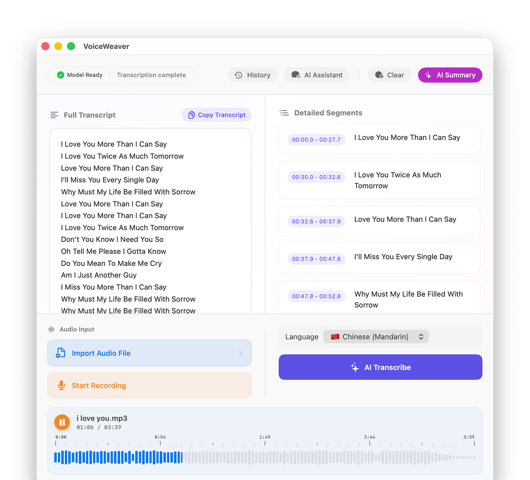
VoiceWeaver is a beautifully designed, native Mac app that packages the power of Whisper into a simple drag-and-drop interface. It is optimized specifically for macOS, meaning it runs Whisper seamlessly using hardware acceleration without draining your battery or freezing your system.
With VoiceWeaver, you can:
- Drag and Drop: Simply drag your audio (MP3, WAV, M4A, FLAC, OGG) or video (MP4, MOV) files into the app.
- Export Subtitles: Instantly generate
.srtor.vttsubtitle files for your video projects. - Speaker Diarization: Easily keep track of who said what during a meeting.
Unlock Offline Speech-to-Text Today
If you have been searching for a reliable Whisper transcription app for Mac, there is no need to pay recurring cloud subscription fees or learn Python.
By leveraging the hardware already built into your Mac, you can achieve world-class AI transcription on your own terms. Try VoiceWeaver today and transform your transcription workflow forever.