Mac Offline Font Subsetting: Minify CJK Fonts to WOFF2

Leibniz Li
@leibnizliWhen building websites, web apps, or digital presentations, have you ever run into this frustrating scenario? You finally find the perfect Chinese, Japanese, or Korean (CJK) font for your main headline, only to realize a single TTF file weighs in at 10MB or more. If you put that on a webpage, the layout loads instantly, but your headline takes seconds to crawl onto the screen. Add a few different font weights, and your first-load performance completely tanks.
The core issue isn't the font itself, but its "full character set". A complete CJK font contains tens of thousands of glyphs, yet your website headline, banner, or pitch deck might only use twenty characters in total.
Subsetting is the process of stripping away every character you don't need, keeping only the exact glyphs you use. After subsetting, a 10MB font can easily shrink down to just a few dozen kilobytes—dropping the file size by multiple orders of magnitude.
Historically, subsetting a font meant either typing long, cryptic pyftsubset commands in the terminal or uploading your font to random online services. However, commercial fonts are strictly bound by licensing agreements. Uploading them to third-party cloud servers means putting your company's valuable assets and compliance at risk.
Now, there is a better, more elegant solution: WebFont: Subset & Convert. Designed exclusively for Mac, this native desktop utility turns the hardcore, underlying engineering of font subsetting into a seamless, elegant click on your Mac.
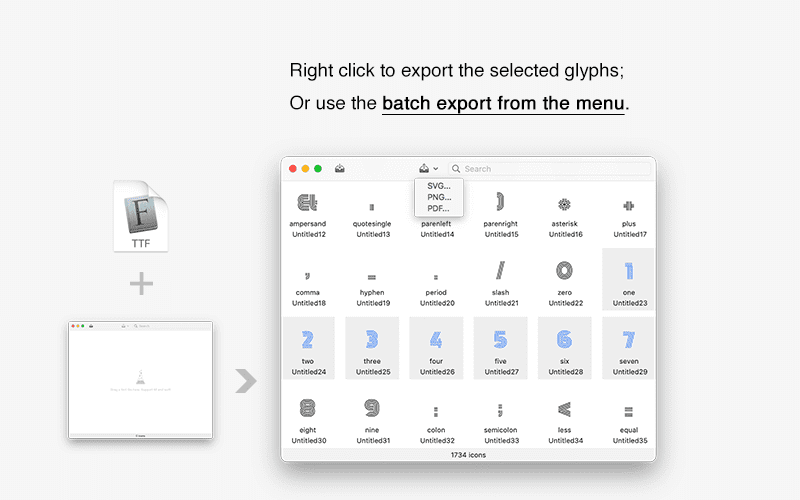
A Silky-Smooth Mac Experience: Pixel-Perfect Subsetting
As a truly native Mac application, WebFont streamlines the complex subsetting process to its absolute simplest. It offers two intuitive ways to define your subset range:
- Current Selection Mode: Simply click and pick the glyphs you want from the visual grid. What you select is what you keep.
- Text Input Mode: Paste your copy directly, or drag and drop a
.txtfile. The tool automatically extracts every unique character to define the exact subset range (with support for predefined Unicode blocks like common Japanese or Korean characters).
Just paste your headline or banner copy into the app, and let WebFont handle the rest. Every character you need is kept; every character you don't is gone.
Beyond "Removing Characters": Precision OpenType Table Control
Most online tools stop at just deleting unused characters. But that’s not enough. Font files don't just hold vector shapes; they also carry massive OpenType layout tables (like GSUB / GPOS) for handling complex ligatures and advanced typography logic. For web usage, this data is often unnecessary bloat that slows down page loads.
WebFont offers three tiers of OpenType strategies, letting you control the fine details of font minification just like adjusting your Mac's System Settings:
- Preserve all layout features: Perfect for scenarios that demand advanced typographic effects like complex ligatures and stylistic alternates.
- Keep essential positioning only: Strips out redundant replacement logic but keeps basic positioning. It delivers a much smaller file without affecting everyday text rendering.
- Remove all layout tables: The ultimate compression. Strips the font down to its bare essentials—as long as the glyphs display correctly, everything else goes.
For the hardcore typography geeks, you can even filter by Feature Tags—precisely checking to keep or specifying to remove distinct OpenType features. This level of granularity is virtually unmatched among similar tools.
Built for Frontend Developers: One-Click Web Package Export
Having a minified font file is only half the battle. To get it running on the web, you still need to manually write @font-face rules, map unicode-range definitions, and code a demo page to test it out.
Acting as a true "Mac productivity engine," WebFont takes care of all this grunt work. With the Web Package Export, it generates a complete, production-ready bundle in a single click:
fonts/Directory: Contains both WOFF2 and WOFF formats. Modern browsers load the highly-compressed WOFF2, while older browsers safely fallback to WOFF.- Ready-to-Use CSS: An auto-generated stylesheet complete with
@font-facedeclarations and the exactunicode-rangefor your subset. demo.htmlPreview: A built-in live preview page that lets you test different font sizes immediately. It even includes a handy reference table mapping "Character → Unicode → HTML Entity" for effortless debugging.
Combining ultra-minified font files with auto-generated unicode-range chunking completely eliminates the performance bottleneck of using CJK fonts on the web.
Estimation and Validation: A Secure, Local Workflow
Many tools treat subsetting as a "blind box"—you generate the file, discover a character is missing, delete the file, and start over. WebFont’s design reflects a deep empathy for Mac users: Before any file is written, the "Subset Preview" panel shows you a real-time estimate.
- Estimated File Size: The moment you select your characters, you see exactly how small your WOFF2/WOFF files will be.
- Missing Character Warnings: If the characters you pasted don't exist in the original font, the system instantly flags them in red. No more discovering messy "tofu" blocks after deployment.
Moreover, before writing the subset font to your Mac's disk, WebFont runs a strict internal validation pass. It verifies decoder validity, checks for required tables, and scans for duplicate Unicode mapping conflicts. All potential errors are intercepted before generation, guaranteeing that the final output is a perfectly healthy, usable file.
Uncompromising Privacy: Your Fonts, Always on Your Mac
Finally, the most crucial point for enterprise users and designers: Privacy and Commercial License Compliance.
All of WebFont’s parsing, subsetting, and format conversion run entirely offline, locally on your Mac. No network connection required, no cloud uploads, and no external server API calls. Your highly valuable commercial font files and unreleased marketing copy stay securely on your own device. You can even flawlessly subset fonts on an international flight without Wi-Fi.
Conclusion
The core purpose of typography is to communicate information, and font subsetting ensures that information is delivered on the web faster and more efficiently.
WebFont encapsulates what used to be a tedious, error-prone, and compliance-risky command-line task into an elegant, professional, and entirely offline Mac-native tool. From character-level extraction and OpenType table control, to pre-generation estimates and validations, to one-click Web Package exports—it perfects the art of font minification.
If you are a frontend engineer, UI/UX designer, or any Mac user who regularly battles performance issues with CJK typography, WebFont is an indispensable productivity powerhouse that deserves a permanent spot in your Dock.