Mac Remote Hosts: Sync and Auto-Update with Helm

Leibniz Li
@leibnizliFor modern development teams, managing local /etc/hosts files manually is no longer viable. When dealing with microservices, staging environments, and internal DNS overrides, ensuring every developer has the correct, up-to-date IP mappings can turn into an operational nightmare.
While editing the hosts file locally works for personal projects, it falls apart at scale. This is where Remote Hosts Management comes in.
In this article, we'll explore the challenges of team hosts file synchronization and how Helm, the premier native macOS remote hosts manager, offers the most robust and elegant solution. If you are looking for a lightweight, native tool, Helm provides exactly what you need to manage your /etc/hosts file remotely.
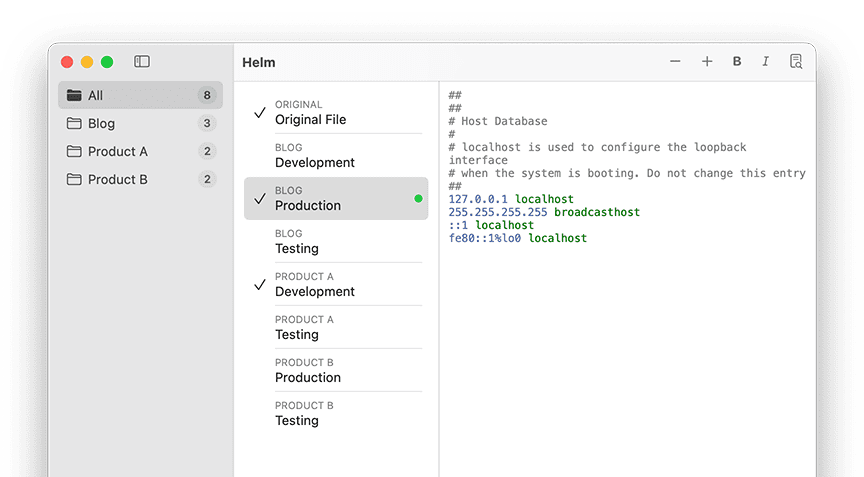
The Challenge of Team Hosts File Synchronization
In a typical software development lifecycle, IP addresses for staging servers, internal APIs, and testing databases change frequently. When teams rely on manual hosts file updates, they inevitably encounter several pain points:
- Stale Configurations: Developers often forget to update their local mappings when an environment changes, leading to hours of wasted debugging time ("It works on my machine!").
- Onboarding Friction: New hires have to manually copy-paste long lists of IPs and domains into their
/etc/hostsfile just to get their local environment running. - Human Error: Manually editing system files frequently results in syntax errors, accidentally deleted lines, or conflicting mappings.
- Security Risks: Distributing hosts configurations via Slack or email is insecure and difficult to audit.
To solve this, organizations need a centralized way to distribute and automatically update hosts configurations across the entire team.
How to Manage /etc/hosts Files Remotely with Helm
Helm isn't just a beautiful, native macOS menu bar app for toggling local profiles—it's engineered with enterprise-grade remote hosts management built right in.
If your team maintains a centralized hosts file on a server, GitHub repository, or an internal network drive, Helm makes syncing it frictionless.
1. Seamless Remote URL Syncing
With Helm, you can add a Remote Profile by simply providing a URL. Helm will fetch the hosts configuration from that address and apply it to your Mac instantly.
Whether your remote file is hosted on GitHub Gist, an AWS S3 bucket, or a private company intranet, Helm seamlessly downloads and parses the rules without requiring manual intervention.
2. Auto-Update Hosts File on Mac
The true power of Helm's remote capabilities lies in its Auto-Update engine. You can configure Helm to automatically fetch the latest version of your remote hosts file at specific intervals (e.g., every hour, every day, or on system startup).
When the DevOps team updates the central staging IP addresses on the server, Helm ensures that every developer's Mac is updated automatically in the background. No one needs to manually pull changes or run terminal commands.
3. Intelligent Profile Merging
Helm's smart merging logic ensures that your remote rules play nicely with your local configurations.
You can run a Remote Profile (for company-wide staging servers) simultaneously with a Local Profile (for your specific Docker containers). Helm dynamically merges these rules in memory and applies them securely without permanently destroying your base /etc/hosts file. When you disable the profiles, your system returns to its default state.
4. Zero-Friction DNS Flushing
Every time Helm fetches an updated remote hosts file, it automatically and instantly flushes your Mac's DNS cache (mDNSResponder). Developers won't even notice the update happened—their domains will simply resolve to the new, correct IP addresses immediately.
5. Secure and Native (Apple Silicon Optimized)
Unlike cross-platform Electron apps that consume massive amounts of RAM, Helm is a 100% native macOS application. It respects your privacy, handles network requests securely, and uses virtually zero system resources, making it the perfect native hosts manager for Apple Silicon (M1/M2/M3) Macs.
Streamline Your Team's Workflow Today
Stop distributing IP mappings via chat messages and relying on developers to manually update their system files. By centralizing your configurations and utilizing Helm's remote sync capabilities, you can eliminate configuration drift and keep your team focused on writing code.
Ready to transform how your team manages environments? Explore Helm for macOS and experience powerful remote hosts management today.