Best Offline Audio Cleaner for iPhone (No Cloud Uploads)

Leibniz Li
@leibnizliWhether you are recording an important interview, taking quick voice memos on the go, or capturing speech for a presentation, unwanted background noise is almost unavoidable on mobile devices. Traffic hums, air conditioner whirs, background chatter, and room reverberation can easily degrade the clarity of your voice.
While there are many AI-based tools available today, almost all of them require you to upload your recordings to third-party cloud servers. For journalists, lawyers, business executives, and anyone dealing with confidential or personal speech, sending sensitive audio to remote servers poses real privacy and compliance risks.
If you are looking for the best offline audio cleaner for iPhone that delivers professional iPhone audio noise reduction without uploading files, AudioWeaver provides a powerful, 100% local solution.
Download AudioWeaver on the App Store
The Problem with Cloud-Based Audio Cleaners
Most audio cleanup applications on iOS are wrappers around remote web APIs. When you tap "enhance" or "clean audio," your entire recording is uploaded over the internet, processed on an external server, and downloaded back to your phone.
This approach creates three major drawbacks:
- Privacy and Confidentiality Risks: Your private conversations, business ideas, and sensitive recordings leave your physical device and sit on third-party servers.
- Heavy Data Usage and Latency: Uploading high-resolution WAV or lossless M4A files over mobile data takes significant time and bandwidth, especially when working in the field with weak cellular reception.
- Aggressive Recurring Subscriptions: Cloud server GPU compute is expensive, so cloud audio tools push costly weekly or monthly subscription models just to process a few minutes of audio.
A privacy focused audio editor for iPhone solves all of these problems by shifting the intelligence directly onto your device.
How AudioWeaver Delivers Studio-Grade Offline Noise Reduction
AudioWeaver is built from the ground up as a local-first mobile audio workstation. It harnesses modern neural acoustic models to isolate human speech and eliminate ambient disturbances entirely offline on your iPhone and iPad.
1. Neural Noise Suppression Without Internet Access
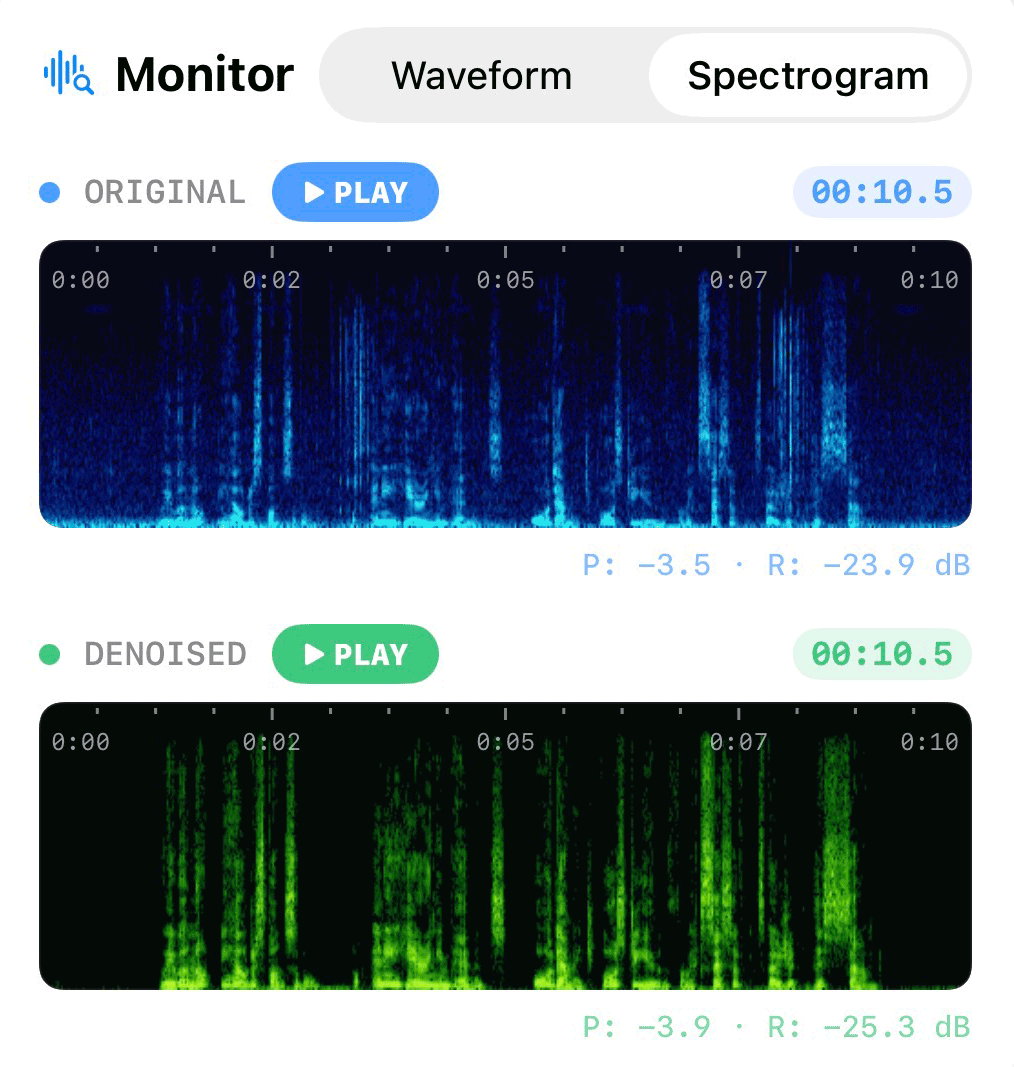
AudioWeaver runs advanced deep neural networks directly on your iPhone. The model analyzes acoustic spectral features in real time, differentiating human voice harmonics from stationary and non-stationary background noise. Whether it is an air conditioner droning in your office, street traffic outside your window, or loud cafe chatter, the engine suppresses the noise while preserving the warmth, resonance, and articulation of your natural voice.
2. Auto De-Clip: Reconstructing Distorted Peaks
One common issue with voice recordings made on smartphones is digital clipping. When a speaker speaks too closely to the microphone or shouts, the waveform peaks get squared off, generating harsh high-frequency harmonics that confuse standard AI models.
AudioWeaver incorporates a proprietary Cubic Hermite Spline Interpolation (Auto De-clip) algorithm as an automatic preprocessing stage. It detects clipped flat tops in the audio waveform and smoothly reconstructs the natural curvature of the wave before feeding it into the neural denoiser. This eliminates harsh digital distortion and prevents AI artifacts.
3. Preserving Natural Speech Dynamics
Many mobile cleaner apps aggressively normalize audio before processing, which can amplify silent room noise or cut off quiet whispers. AudioWeaver preserves 32-bit floating-point dynamic range throughout the entire pipeline. Your vocal inflections, breathing, and subtle nuances remain intact, avoiding the artificial "underwater" sound typical of low-quality noise gates.
Step-by-Step: How to Remove Background Noise from Voice Recordings on iPhone
Using AudioWeaver as your go-to app to remove background noise from voice recording is straightforward:
Step 1: Import Your Recording
Launch AudioWeaver on your iPhone. Tap Import to bring in your recording directly from the Files app, iCloud Drive, or the Voice Memos app via the iOS Share Sheet.
Step 2: Apply Voice Noise Reduction
Select your audio track and tap Voice Noise Reduction. AudioWeaver's local AI engine instantly processes your file. Because processing happens purely on-device using multi-core CPU optimization, your file begins cleaning immediately without any network waiting queues.
Step 3: Preview the Clean Waveform
Use the interactive waveform player to preview your audio. You can toggle between the original and cleaned audio in real time to hear the dramatic difference in speech clarity and silence in the pauses.
Step 4: Fine-Tune with Built-in Effects (Optional)
If your voice recording needs additional polish, AudioWeaver includes studio-grade mastering utilities:
- Equalizer: Boost vocal clarity and reduce muddy low frequencies.
- Dynamic Normalize / Loud Normalize: Balance uneven speaking volumes across the conversation.
- Speech Isolation: Enhance vocal presence against stubborn ambient hums.
Step 5: Export Losslessly
Tap Export to save your clean audio file. You can choose from a wide range of formats including WAV, M4A, MP3, FLAC, and CAF, with full control over bitrates and sample rates.
Complete Peace of Mind for Your Audio
Whether you are a creator editing voice tracks, a professional handling sensitive interviews, or a student cleaning lecture recordings, you should never have to compromise your privacy for audio quality.
With AudioWeaver, you get the best offline audio cleaner for iPhone: zero server uploads, no privacy compromises, instant processing speed, and studio-grade voice clarity right in your pocket.